How I Built SuppBot
a self-hosted support chatbot that drops into any site with one script tag and your markdown docs.
Where the idea came from
I had docs scattered across multiple products, and no easy way to put a chatbot in front of any of it without rebuilding the same setup each time. I just wanted to organize each product’s docs into one file, split into the sections people actually ask about - FAQs, common issues, explainers, API routes - and have something that could answer from them.
So I built SuppBot: one small service I host once, point at any product’s docs, and call from anywhere. A chat bubble that’s simple to use, answers grounded in the docs themselves, and nothing extra to set up before it works.
The components
SuppBot is made up of 3 pieces
- a tiny JS widget
- a Node backend
- an AI call
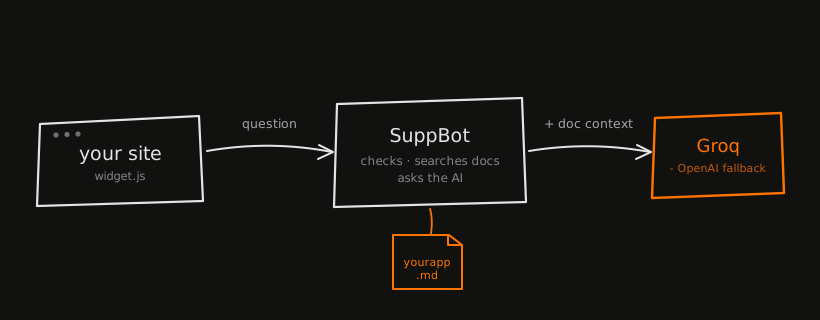
your site sends a question, SuppBot checks and searches your docs, then hands the question plus the relevant doc context to Groq (or OpenAI) and streams the answer back.
Under the hood
The widget
It’s a single IIFE - no dependencies, under 12KB. It reads its config off data-* attributes and builds the whole chat UI at runtime, so it works the same on WordPress, a hand-coded page, or a Next.js app.
<script src="https://yourdomain.com/widget.js"
  data-widget-token="pub_yourapp_secretkey"
  data-title="YourApp Support"
  data-primary-color="#2563eb">
</script>
replies get rendered with basic markdown (bold, code, lists), so I escape HTML entities first and run a tiny parser over the escaped text.
What actually happens on the server
Zooming in further, a single request goes through five steps before anything reaches the AI:
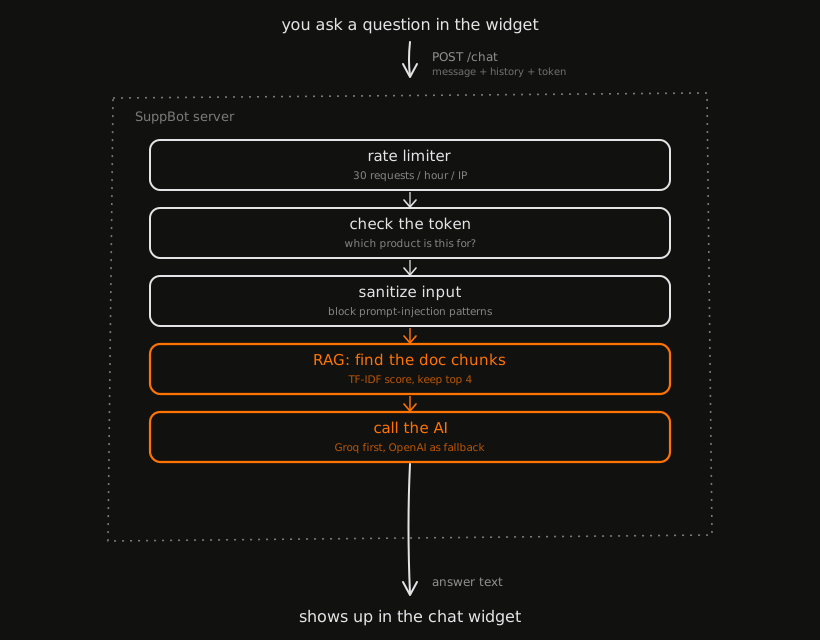 one request, five steps, before it ever reaches Groq or OpenAI
The request hits the rate limiter first, then a token check to figure out which product the question belongs to, then input sanitization, then retrieval, then the AI call itself. Each stage can reject or short-circuit the request, which keeps a bad question from ever reaching the model. The two stages worth digging into are sanitization and retrieval - the rest of this section walks through both.
Finding the right doc chunk
Real RAG setups embed every chunk into a vector database and run similarity search. I used TF-IDF instead - a decades-old keyword-scoring technique. No embeddings, no vector DB. Docs get split by heading. Each chunk is scored against the keywords in the question - full weight for exact matches, a smaller bonus for partial ones, and a log curve so one repeated word can’t flood the score.
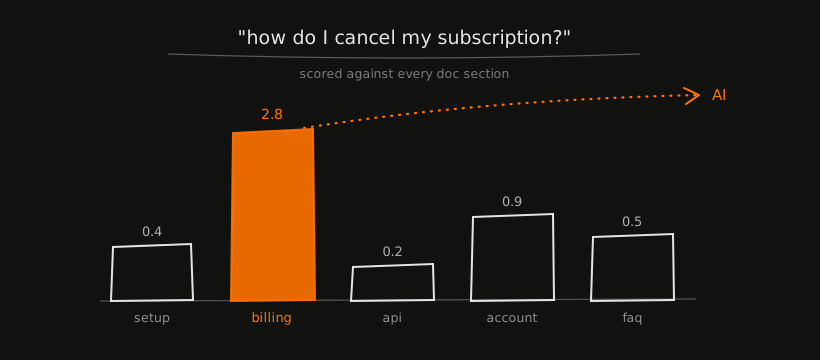 ‘how do I cancel my subscription?’ scored against five doc sections - billing wins at 2.8, account a distant second at 0.9
That’s a real example: a cancellation question scores highest against the billing section, comfortably ahead of account, faq, setup, and api. Only the winning section gets sent to the AI as context, which keeps the prompt small and on-topic.
It’s not as good as semantic search - “downgrade” won’t match a doc that only says “switch tiers.” But over well-written docs, it gets close enough that the AI bridges the rest.
Keeping it safe
A public chatbot widget has a real attack surface, so a few guards run before any AI call: a regex filter for obvious prompt injection (“ignore previous instructions,” fake system tokens), per-IP rate limiting (30 requests/hour, Cloudflare-aware), and input validation that caps message length and sanitizes conversation history.
None of it is bulletproof - regex won’t stop someone determined - but it kills the casual attempts.
Talking to the AI
Groq runs first, OpenAI is the fallback:
export async function callAI(messages) {
  const providers = [];
  if (process.env.GROQ_API_KEY) providers.push(callGroq);
  if (process.env.OPENAI_API_KEY) providers.push(callOpenAI);

  for (const call of providers) {
    try { return await call(messages); }
    catch (e) { console.warn(`provider failed: ${e.message}`); }
  }
  throw new Error("AI service temporarily unavailable.");
}
Groq’s llama-3.1-8b-instant is fast, and speed matters more than depth when someone’s asking “how do I export my data.” Both providers run at temperature: 0.3 and max_tokens: 200 - concise and on-topic, not an essay.
The system prompt has one non-negotiable line: if the answer isn’t in the docs, say so. A bot that invents features is worse than no bot.
Docs that update themselves
If docs/yourapp.md contains just a URL instead of content, SuppBot fetches the live markdown at request time (it auto-handles HackMD’s /download suffix) and caches it for 5 minutes. Edit your doc, and the bot knows within 5 minutes - no redeploy.
What’s next
- Local embeddings (probably Ollama +
nomic-embed-text) so retrieval catches synonyms TF-IDF misses - Streaming responses
- A minimal dashboard showing the questions it couldn’t answer
- Human handoff when it’s stuck - email, Slack, a contact form
- One-click deploy via
railway.json/render.yaml